May 15th, 2019



The Limit Up-Limit Down (LULD) mechanism is intended to prevent trades in National Market System (NMS) securities from occurring outside of specified price bands.
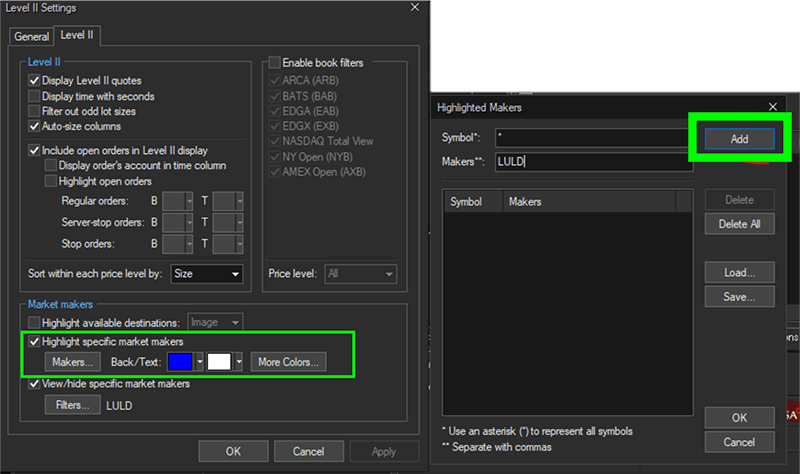
To set this up in Sterling Trader® Pro, from the Level 2 Window, go to VIEW > SETTINGS From the Level 2 Tab to the Market Makers Box and check Highlight Specific Market Makers.
From the Highlight Makers Window, SET the Symbol field: * Set the Makers field: LULD Press ADD
Without filtering you don’t see the LULD because it’s fairly outside of the market. To filter your view, go to view/hide specific market makers. Click filters, then choose LULD Press ACTIVATE
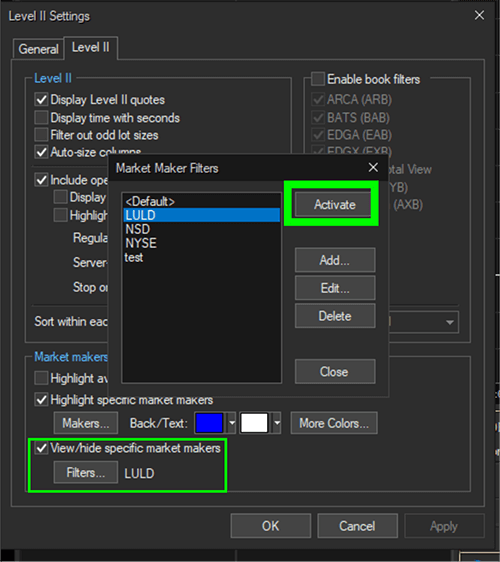
Then you end up with only showing the LULD

We look forward to learning more about your trading needs.

Market Asymmetry Before It Moves You
In today’s markets, sharp price moves rarely come out of nowhere. They build quietly ...

Sterling OMS 360: A New Era in OMS
The newly launched OMS provides the only real-time margin and multi-asset capability during ...

The Intersection of Pre- and Post-Trade Risk
Effective risk management is paramount in today's fast-evolving financial landscape. Firms ...

Sterling Trading Tech wins Best Listed Derivatives Trading Platform in APAC - Recognized at the A-Team Capital Markets Technology Awards APAC 2025
Sterling Trading Tech (Sterling), a leading provider of professional trading technology ...
